
A multi-provider AI coding assistant CLI — like Claude Code and Gemini CLI, but open source.




DevOrch gives you a coding assistant in your terminal that can execute shell commands, edit files, search your codebase, manage terminal sessions, and remember context across conversations — powered by any of 13+ AI providers or your own local models.
| Startup | Chat |
|---|---|
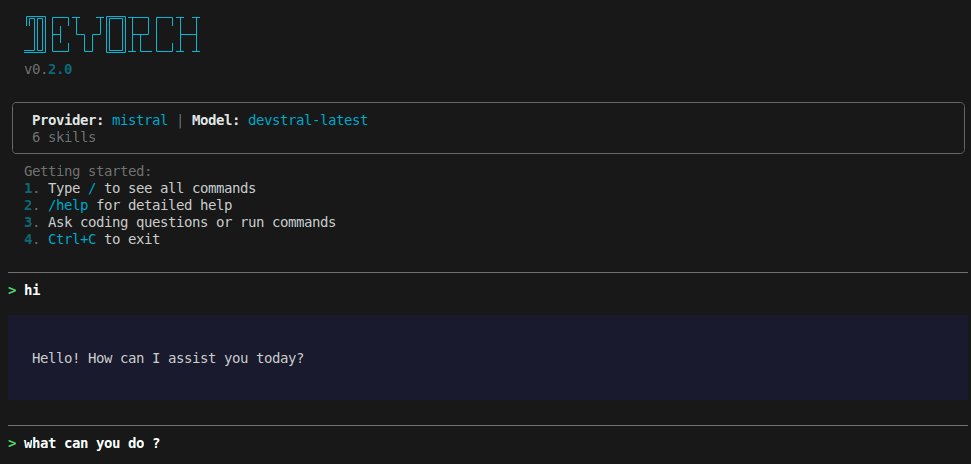 |
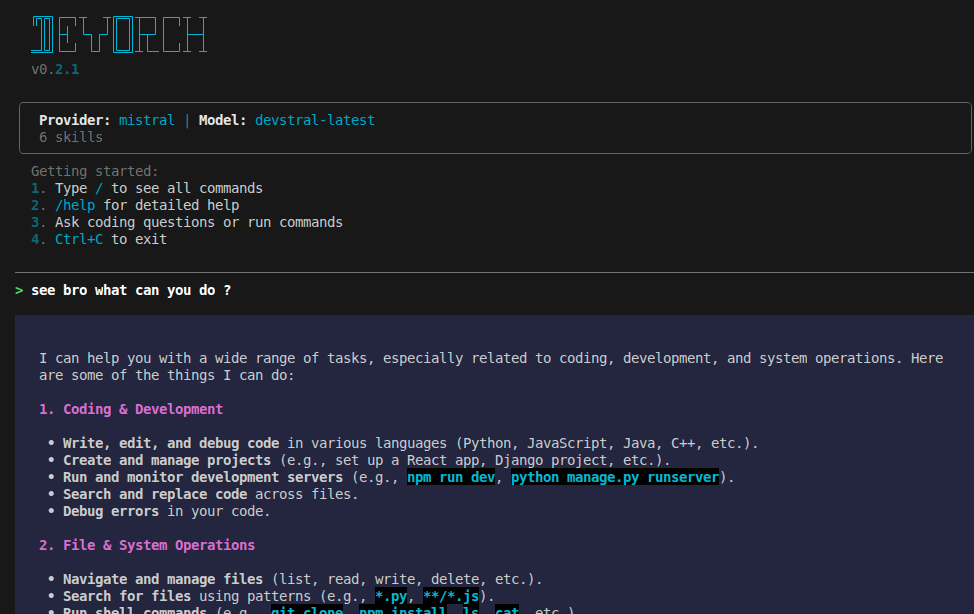 |
| Provider Selection | Model Selection |
|---|---|
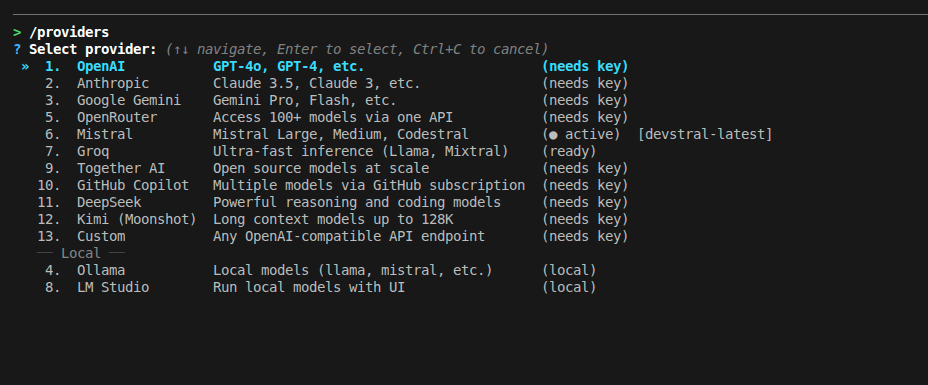 |
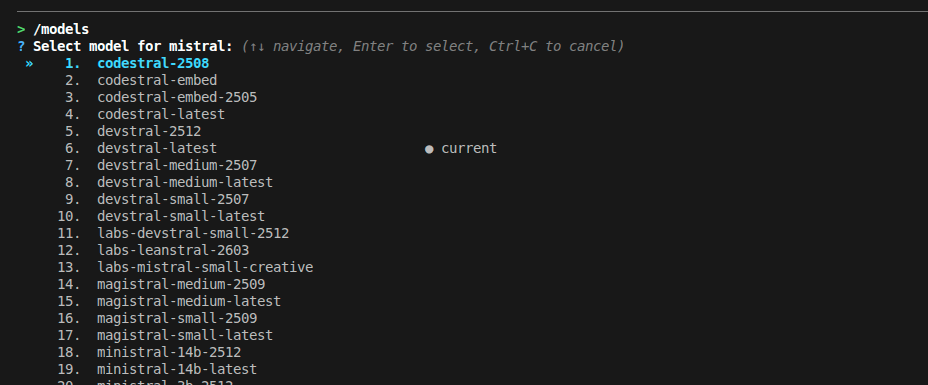 |
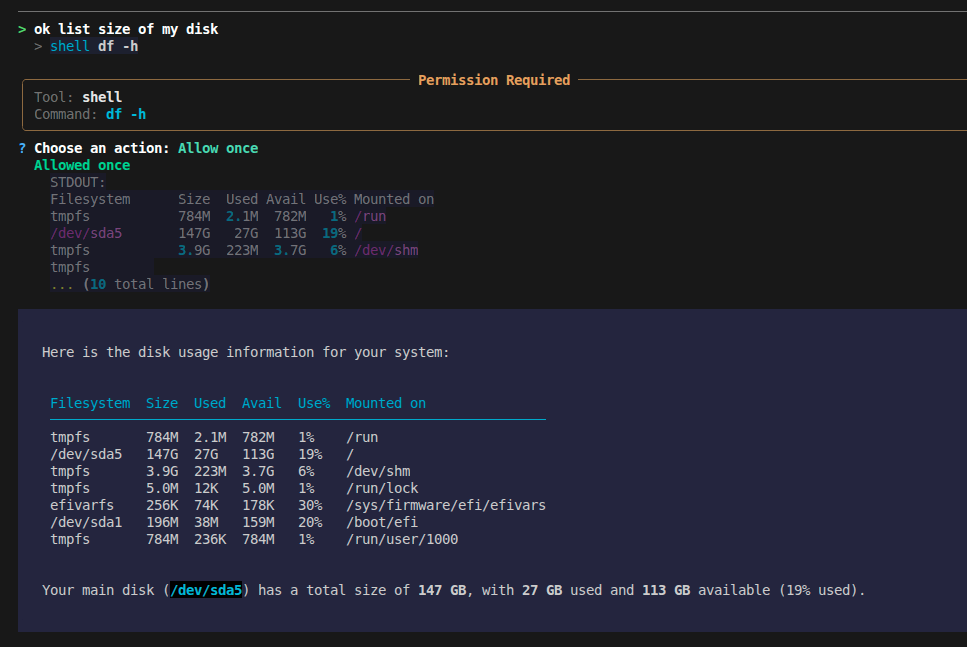
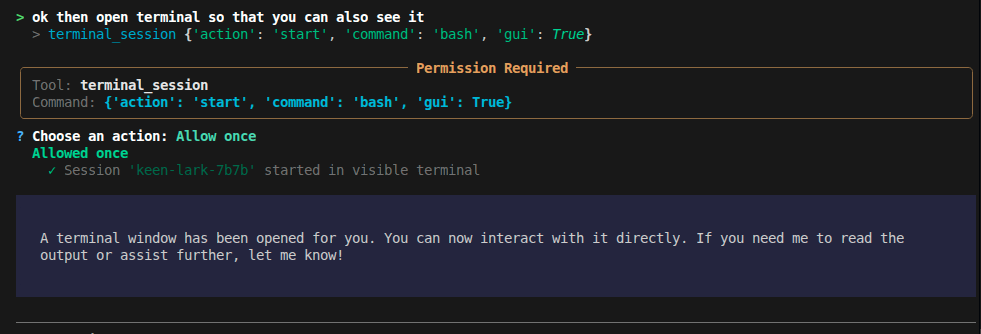
| Tool Execution | Terminal Session |
|---|---|
 |
 |
- Provider freedom — Switch between OpenAI, Anthropic, Gemini, Mistral, Groq, and 8 more providers (including local models) with a single command. No vendor lock-in.
- Actually does things — Runs shell commands, edits files, manages background processes, searches the web. Not just a chatbot.
- Cross-session project memory — Per-project persistent memory system automatically recalls architecture decisions, coding preferences, and recent session milestones across sessions.
- Loop & thrashing safeguards — Advanced safety layer detects duplicate calls, tool oscillation, and error loops, preventing runaway token drain.
- Full token & speed transparency — Real-time prompt/completion token tracking, context compaction metrics, and generation speed (
tok/s) across 13 providers. - Extensible — Add custom skills as YAML files, connect MCP servers for additional tools, configure permissions per-tool.
# Recommended
pipx install devorch

# Or with pip
pip install devorch

# Or from source
git clone https://github.com/Amanbig/DevOrch.git
cd DevOrch && pip install -e .devorch # Interactive setup on first run
devorch -p openai # Use a specific provider
devorch -p local # Use Ollama (local models)
devorch --resume abc123 # Resume a previous session
# Non-interactive (scripting / CI)
devorch ask "explain this project"
devorch ask --skill commit
devorch run review "focus on security"
devorch edit src/auth.py "add input validation"On first run, DevOrch walks you through provider selection and API key setup.
| Cloud | Local / Self-Hosted |
|---|---|
| OpenAI (GPT-4o, o1) | Ollama (Llama, Mistral, CodeLlama) |
| Anthropic (Claude 4, 3.5) | LM Studio (any GGUF model) |
| Google Gemini (2.0, 1.5 Pro) | Custom (vLLM, TGI, llama.cpp) |
| Groq (ultra-fast Llama, Mixtral) | |
| Mistral (Large, Codestral) | |
| Together AI, OpenRouter, GitHub Copilot, DeepSeek, Kimi |
Switch anytime with /providers (interactive) or /provider <name> (direct).
DevOrch can act on your system, not just talk about it:
| Tool | What it does |
|---|---|
shell |
Execute commands (git status, npm install, etc.) |
terminal_session |
Managed background processes with optional GUI window |
filesystem |
Read, write, list files |
search / grep |
Find files and search contents |
edit |
Targeted find-and-replace edits |
task |
Track progress on multi-step work |
memory |
Persistent memory across conversations |
websearch / webfetch |
Search the web, fetch URLs |
DevOrch maintains persistent memory so you never have to repeat context:
1. Per-Project Memory (Cross-Session Recall)
Stored automatically per repository in ~/.devorch/projects/<project_id>/:
/memory                              # View active architectural decisions & session history
/memory add Use uv for package management   # Record an architectural decision
/memory pref Prefer clean async/await       # Record a coding style preference
/memory clear                        # Clear project memory for this repository
Accomplishments are automatically extracted and summarized on session exit with zero raw command leakage.
2. Global Memory (Across All Projects)
Stored in ~/.devorch/memory/:
/remember I prefer tabs over spaces
/remember Use ruff for Python linting
/forget # Interactively choose a memory to removeReusable prompt templates for common workflows. Use them in chat or directly from the CLI:
# In chat
/commit       # Generate a descriptive git commit
/review       # Review code changes for bugs
/test         # Run tests and analyze results
/fix          # Fix the last error
/explain      # Explain project structure
/simplify     # Simplify recent code changes

# From the terminal (non-interactive)
devorch run commit
devorch run review "focus on auth module"
devorch run test

devorch skills              # List all available skills
Add your own in ~/.devorch/skills/:
# ~/.devorch/skills/deploy.yaml
name: deploy
description: Deploy to production
prompt: |
  Run the deploy script and verify it succeeds.
Check the deploy logs for any errors.Background processes that persist across DevOrch restarts:
# Headless — AI monitors output
> terminal_session start command="npm run dev"
  Session 'swift-fox-a3f2' started (PID 12345)

# With GUI — user gets a visible terminal, AI can still read output
> terminal_session start command="bash" gui=true
  Session 'calm-owl-b7e1' started in visible terminal

# Check output / send input / stop
> terminal_session read session_id="swift-fox-a3f2"
> terminal_session send session_id="swift-fox-a3f2" input="rs\n"
> terminal_session stop session_id="swift-fox-a3f2"Extend DevOrch with external tool servers:
# ~/.devorch/config.yaml
mcp_servers:
  github:
    command: npx
    args: ["-y", "@modelcontextprotocol/server-github"]
    env:
      GITHUB_TOKEN: "ghp_xxx"
  filesystem:
    command: npx
    args: ["-y", "@modelcontextprotocol/server-filesystem", "/home/user"]
MCP tools appear alongside built-in tools automatically.
Manage MCP servers live in chat:
/mcp                          # Show connected servers and their tools
/mcp add github npx -y @modelcontextprotocol/server-github
/mcp start github             # Reconnect a server from config
/mcp stop github              # Disconnect and remove its tools
Filter MCP servers per CLI run:
devorch ask --mcp github "review open PRs"   # Use only the github server
devorch ask --mcp github --mcp filesystem "..."  # Use specific servers
devorch run commit --no-mcp # Skip MCP entirely| Mode | Behavior |
|---|---|
| ASK (default) | Asks permission before each tool execution |
| AUTO | Executes tools automatically (dangerous commands still blocked) |
| PLAN | Shows a plan before executing, asks for approval |
Fine-grained control over what DevOrch can do:
devorch permissions list                    # View current rules
devorch permissions set shell allow         # Always allow shell
devorch permissions allow shell "git *"     # Allow specific patterns
devorch permissions deny shell "rm -rf *"   # Block dangerous commands
Or use /auth in-chat to set API keys without restarting.
DevOrch works as a scriptable CLI too — no REPL needed:
# Ask a one-shot question
devorch ask "what does this codebase do?"
devorch ask --skill review "focus on security"
devorch ask --mode plan "refactor the auth module"

# Run a skill directly (shorthand for ask --skill)
devorch run commit
devorch run test "only unit tests"
devorch run review --no-mcp

# Edit a file with an instruction
devorch edit src/auth.py "add input validation to login"
devorch edit README.md "update the installation section"
devorch edit app/models.py "add created_at field" --mcp sqlite

# List available skills
devorch skills

# Browse providers and models directly from terminal
devorch providers               # View all 13 providers & configuration status
devorch models                  # View models for active provider
devorch models anthropic        # View models for a specific provider

# Inspect or manage project memory
devorch memory                  # View project decisions and recent accomplishments
devorch memory add "Use pytest" # Record a decision from the terminal
devorch memory clear            # Clear project memory

# Repository initialization
devorch init                    # Generate or update DEVORCH.md repository instructions
All non-interactive commands support --provider, --model, --mode, --mcp, and --no-mcp.
| Command | Description |
|---|---|
/help |
Show categorized commands and shortcuts |
/mode [plan|auto|ask] |
Show or switch execution mode |
/plan /auto /ask |
Quick switch execution mode |
/models |
Search and browse models with 15/page pagination |
/model <name> |
Switch model directly or launch search |
/providers |
Search and browse providers with interactive pagination |
/provider <name> |
Switch provider directly or launch search |
/tokens |
Show session token usage, prompt/completion split, and costs |
/copy |
Copy last assistant response directly to clipboard |
/paste |
Enter multi-line paste mode for large text or code (Alt+Enter also inserts newlines) |
/status |
Show current provider, model, execution mode, and loaded context |
/auth [provider] |
Set or update API key for any provider |
/memory |
Show project memory (/memory add <dec>, /memory pref <p>, /memory clear) |
/remember <text> |
Save a note or convention to global memory |
/forget |
Delete a global memory interactively or by query |
/init |
Generate or update a DEVORCH.md project context file |
/skills |
List available skills |
/skill <name> |
Run a skill directly |
/commit /review /test /fix /explain /simplify |
Skill shortcuts |
/session |
Current session ID, model, and message count |
/history |
Full conversation history in this session |
/clear |
Clear history (saves accomplishments to project memory) |
/compact |
Summarize and compact conversation history to save tokens |
/save |
Save conversation history to a file |
/undo |
Undo last message and agent turn |
/mcp |
Show MCP server status |
/mcp add <name> <cmd> [args] |
Connect a new MCP server mid-session |
/mcp start <name> |
Reconnect a server from config |
/mcp stop <name> |
Disconnect a server and remove its tools |
/config |
Show configuration settings |
/permissions |
Show and manage tool permission settings |
/tasks |
Show multi-step task list and execution progress |
# Secure keychain storage
devorch set-key openai
devorch set-key anthropic

# Or in-chat
/auth openai

# Or environment variables
export OPENAI_API_KEY=sk-...
export ANTHROPIC_API_KEY=sk-ant-...
export GOOGLE_API_KEY=...
export GROQ_API_KEY=gsk_...
export MISTRAL_API_KEY=...
export OPENROUTER_API_KEY=sk-or-...
export TOGETHER_API_KEY=...
export GITHUB_TOKEN=ghp_...
export DEEPSEEK_API_KEY=sk-...
export MOONSHOT_API_KEY=sk-...# ~/.devorch/config.yaml
default_provider: openai
providers:
openai:
default_model: gpt-4o
anthropic:
default_model: claude-sonnet-4-20250514
custom_vllm:
default_model: meta-llama/Meta-Llama-3-70B-Instruct
base_url: http://localhost:8000/v1
mcp_servers:
github:
command: npx
args: ["-y", "@modelcontextprotocol/server-github"]
env:
GITHUB_TOKEN: "ghp_xxx"~/.devorch/
├── config.yaml # Provider settings, MCP servers
├── permissions.yaml # Tool permission rules
├── sessions.db # Chat history (SQLite)
├── memory/ # Persistent memories
│ ├── MEMORY.md
│ └── *.md
├── skills/ # Custom skill definitions
│ └── *.yaml
└── sessions/ # Terminal session logs
├── registry.json
└── *.log
Contributions are welcome! Here's how to get started:
# Clone and install in development mode
git clone https://github.com/Amanbig/DevOrch.git
cd DevOrch
pip install -e ".[dev]"

# Run linting
ruff check .
ruff format .

# Run tests
pytest- Run
ruff check .andruff format .before submitting - Add tests for new features
- Keep PRs focused — one feature or fix per PR
- Update the README if adding user-facing features
DevOrch/
├── cli/
│   ├── main.py           # App wiring, REPL, sessions/config commands
│   ├── constants.py      # VERSION, banners, slash-command registry, styles
│   └── commands/
│       ├── _shared.py    # Shared helpers (agent builder, tool setup, etc.)
│       ├── ask.py        # devorch ask
│       ├── run.py        # devorch run
│       └── edit.py       # devorch edit
├── core/             # Agent, executor, memory, MCP, skills, modes
├── config/           # Settings, permissions
├── providers/        # AI provider implementations
├── tools/            # Built-in tools (shell, edit, search, etc.)
├── schemas/          # Pydantic models
├── utils/            # Logging, display helpers
└── tests/            # Test suite
- Streaming responses
- Multi-file context awareness
- Plugin marketplace
- VS Code extension
- Agent-to-agent delegation
- Python 3.10+
- Works on Linux, macOS, and Windows
Built by Aman — star the repo if you find it useful!