
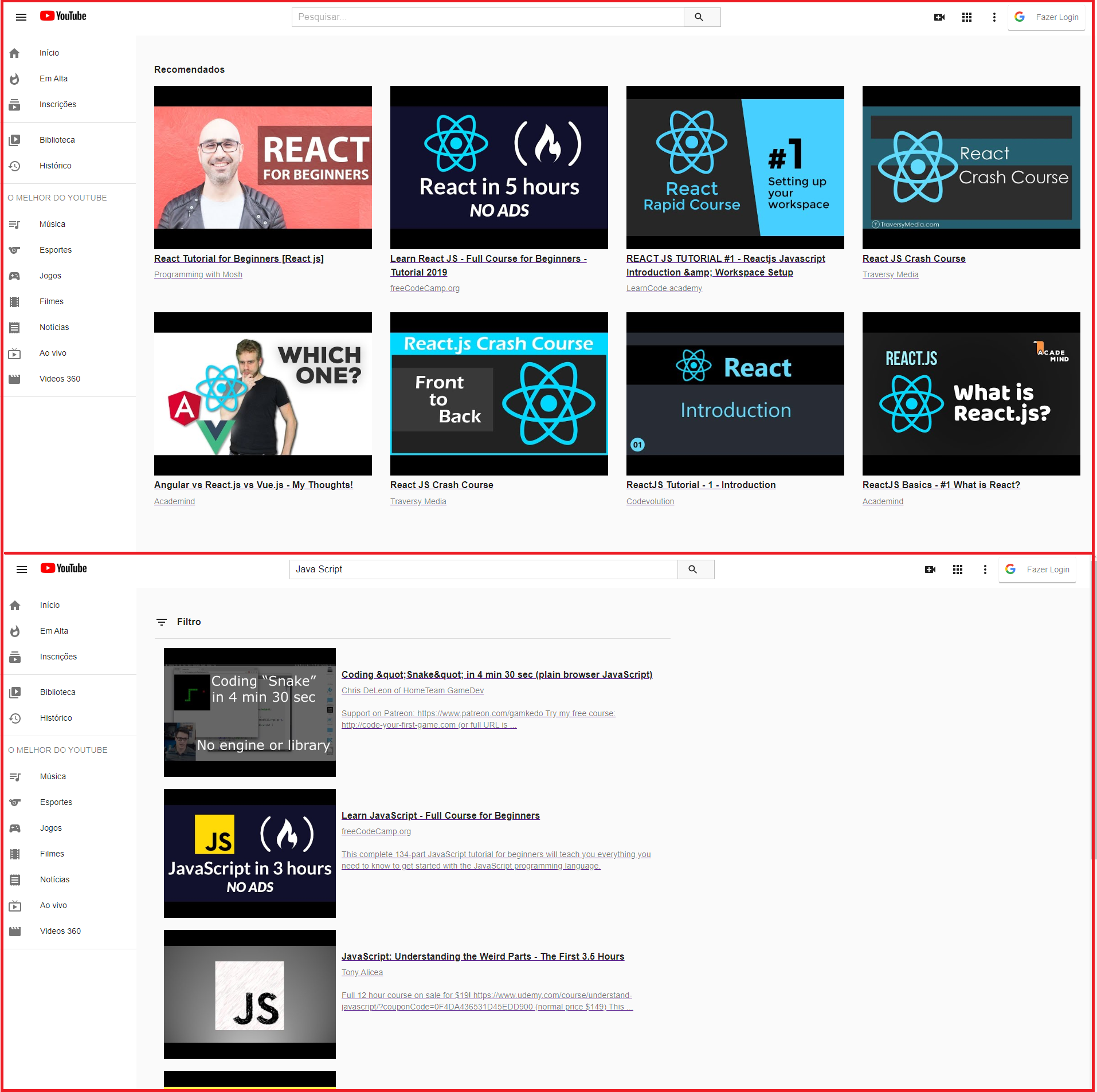
This project is part of my personal portfolio, I did it only with the intention of improving my skills in React.js, so, I'll be happy if you could provide me any feedback about the project, code, structure or anything that you can report that could make me a better developer! It is a project that consumes the YouTube API and has a layout similar to YouTube. As much as possible, I tried to be faithful to YouTube's design in its July/2020 desktop version.
Email-me: vini_bernal@hotmail.com
Connect with me at LinkedIn
1 - As YouTube was developed on the basis of Material Design, for this challenge I used Material-UI, which brings all the resources of Material Design to projects in React.
2 - You need to create a project in the Google Developer Console. Activate YouTubeData API V3 within the project. And create an access credential so that your app can communicate with the API. Be aware of the daily quota of requests that we can make the API.
3 - The user can log in to the application through the YouTube API with OAuth2. To do this, you need to create credentials within your project.
4 - The Authorized JavaScript origin URI and the authorized redirect URIs must point to http://localhost:3000. The file with the credentials and the redirect URIs is already in the project. You just need to enter your credentials.
-
Home Page, Header, NavBar and Main Components are rendered:
- Header Component: the user can login/logout or search for any video they want to watch;
- Main Component: by default, a list of videos related to the 'React' theme will always appear on the homepage. This theme goes according to the library that this application was built;
- NavBar Component: this component is static in the application and was inserted only to improve the user experience when browsing the Homepage.
-
Results Page: Header, NavBar components and Results page content are rendered:
- Header Component: the user can login/logout or search for any video they want to watch;
- NavBar Component: this component is static in the application and was inserted only to improve the user experience when browsing the Homepage.
- Results Page: when the user searches the header on the topic of the video he wants to watch, it is on the results page that the search result is rendered. By default, a total of eight videos related to the research topic are returned.
-
Watch Page: the Header Component and Watch page content are rendered:
- Header Component: the user can login/logout or search for any video they want to watch;
- Watch Page: when the user is on the Home or Results Page, he can click on any video he wants to watch. When performing this action, he is redirected to the Watch page. At that moment, the user can click and watch the chosen video.
To run this project in the development mode, you'll need to have a basic environment to run a React App, that can be found here.
Cloning this repository
$ https://github.com/bernalvinicius/youtube-clone.git
$ cd youtube-clone
Installing Dependencies
$ yarn
or
$ npm install
Running
With all dependencies installed and the environment properly configured, you can now run the app:
$ npm start
Obs: Below I will talk about some plugins, all of them in Visual Studio Code.
After generating a new project with 'npx create-react-app', I created some extra files to leave the application preconfigured in compilation and indentation levels.
The following files were created: (at the root of the project):
- .editorconfig:
For this file to be valid, it must be added the extension EditorConfig for VS Code. With the extension installed and the file created, you can define certain code style indications. Things like how many spaces a tab should have. This can reduce friction when working with a team of multiple programmers. For more informations: EditorConfig.
- .prettierrc
For this file to be valid, it must be added the extension Prettier – Code formatter. Prettier is nothing more than a code formatter, it ensures that all the code issued is in accordance with a consistent style. For example, you can write a line of code that is too long, you can limit the maximum line length to 60 characters and then Prettier will do the work of organizing the code for you. With the extension installed and the file created, the configuration of the file can be started. For more informations: Prettier.
- jsconfig.json
The jsconfig.json file specifies the root files and options for the features provided by the JavaScript service. For example, by default the JavaScript language service will analyze and provide IntelliSense for all files in your JavaScript project. If you want to specify which files to exclude or include to provide the appropriate IntelliSense, you can use a property in jsconfig.json for this. For more informations: jsconfig.json.
- .eslintrc.js
ESLint is designed to be configurable, you can disable all rules and execute only with basic syntax validation, or mix and match grouped rules and custom rules. We set up ESLint through the .eslintrc.js file, it specifies all the configuration information we want to apply. For more informations: Documentation of ESLint. You must also install the ESLint extension.
After creating all these files and extensions, the following dependencies were installed:
- React - JavaScript library for creating user interfaces
- React-Router - Routes
- Axios - HTTP Client
- React-Google-Login - A Google OAUth login/logout component for React
- ESlint - Linter
- eslint-config-airbnb - This package provides Airbnb .eslintrc as an extensible shared configuration
- eslint-config-prettier - Disables all rules that are unnecessary or may conflict with Prettier
- eslint-import-resolver-alias - This is a simple Node.js module import resolution plugin for eslint-plugin-import, which supports native Node.js module resolution, alias / mapping module and custom file extensions.
- eslint-plugin-import - This plugin supports ES2015 + import/export syntax (ES6 +) and avoids problems with misspellings of file paths and import names
- eslint-plugin-jsx-a11y - Static AST (abstract syntax tree) checker for accessibility rules in JSX elements
- eslint-plugin-prettier - Run Prettier as an ESLint rule and report differences as individual ESLint problems
- eslint-plugin-react - Specific learning rules for ESLint
- eslint-plugin-react-hooks - Apply the Hooks rules
- Prettier - Code formatter
- prop-types - Runtime type checking for React props and similar objects. You can use prop-types to document the intended types of properties passed to components. React will check past props for its components against these definitions and notify them in development if they do not match
- customize-cra - Provides a set of utilities to customize the settings of versions 02 and 03 of create-react-app, taking advantage of the main features of react-app-rewired
- customize-cra-react-refresh - Provides a simple way to integrate react-refresh into your create-react-app using customize-cra and @pmmmwh/react-refresh-webpack-plugin
You can send how many PR's do you want, I'll be glad to analyse and accept them! And if you have any question about the project...
Email-me: vini_bernal@hotmail.com
Connect with me at LinkedIn
Thank you!