© The Chancellor, Masters and Scholars of The University of Oxford. All rights reserved.
This course is available for multiple cloud providers. Choose your preferred platform:
- Hello Google Cloud
- Hello Microsoft Azure (You are here)
- Hello Amazon Web Services (⭐ Most popular)
- Hello IBM Cloud
Clone this repository (Optional: fork it)
git clone https://github.com/Oxford-Research-Cloud-Competency-Centre/Hello-azure.git
Zip the repository
git archive --format=zip --output=output.zip HEADGo to App Service/Create/Web App. Create a new App Service titled "hello-azure" with default settings, a Basic B1 plan (at least 1 VCPU / 1 GB RAM). When prompted, create a new resource group "rg-hello-azure". Select the latest Python runtime (3.14).

Go to Deployment/Deployment Center/Manual Deployment and upload the zip file that you created earlier

The app should now be publicly accessible.

The previous command will only zip committed changes. Change the command to be able to include uncommitted changes.
zip -r output.zip . -x ".git/*"You can create your own git repository and set it as the source in Deployment/Deployment Center. Pushing commits to GitHub will now update the app automatically.

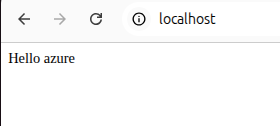
index.html controls the appearance of your website. Currently its only content is "Hello azure". Try modifying it. For example:

View source code
<!DOCTYPE html>
<html lang="en">
<head>
    <meta charset="UTF-8">
    <meta name="viewport" content="width=device-width, initial-scale=1.0">
    <title>Hello Azure - BORAT EDITION</title>
    <style>
        * {
            margin: 0;
            padding: 0;
            box-sizing: border-box;
        }

        html, body {
            width: 100%;
            min-height: 100vh;
        }

        body {
            background: #000;
            font-family: Impact, Haettenschweiler, 'Arial Narrow Bold', sans-serif;
            display: flex;
            flex-direction: column;
            justify-content: center;
            align-items: center;
            padding: 20px;
            background: linear-gradient(135deg, #ff0000, #ff8800, #ffff00, #00ff00, #0088ff, #ff00ff, #ff0000);
            background-size: 800% 800%;
            animation: BGRAINBOW 3s ease infinite;
        }

        @keyframes BGRAINBOW {
            0% { background-position: 0% 0%; }
            50% { background-position: 100% 100%; }
            100% { background-position: 0% 0%; }
        }

        h1 {
            font-size: 18rem;
            line-height: 0.9;
            font-weight: 900;
            text-align: center;
            margin: 20px 0 40px 0;
            letter-spacing: -0.02em;
        }

        h1 .letter {
            display: inline-block;
            -webkit-text-stroke: 6px #000;
            text-shadow:
                10px 10px 0 #000,
                0 0 30px #fff,
                0 0 60px currentColor;
            animation: WIGGLE 0.2s ease-in-out infinite alternate;
        }

        h1 .space {
            display: inline-block;
            width: 0.5em;
        }

        .c1 { color: #FF0000; animation-delay: 0s; }
        .c2 { color: #FF8800; animation-delay: 0.05s; }
        .c3 { color: #FFFF00; animation-delay: 0.1s; }
        .c4 { color: #00FF00; animation-delay: 0.15s; }
        .c5 { color: #00FFFF; animation-delay: 0.2s; }
        .c6 { color: #0088FF; animation-delay: 0.25s; }
        .c7 { color: #8800FF; animation-delay: 0.3s; }
        .c8 { color: #FF00FF; animation-delay: 0.35s; }
        .c9 { color: #FF0088; animation-delay: 0.4s; }
        .c10 { color: #FF0000; animation-delay: 0.45s; }
        .c11 { color: #00FF88; animation-delay: 0.5s; }

        @keyframes WIGGLE {
            0%   { transform: translateY(0) rotate(-3deg) scale(1); }
            100% { transform: translateY(-40px) rotate(3deg) scale(1.15); }
        }

        .pic {
            width: 90%;
            max-width: 800px;
            border: 20px solid #FFD700;
            border-radius: 25px;
            box-shadow:
                0 0 0 10px #FF0000,
                0 0 0 20px #00FF00,
                0 0 0 30px #0000FF,
                0 0 80px 20px #FF00FF,
                0 20px 60px rgba(0,0,0,0.8);
            animation: FLOAT 2s ease-in-out infinite, GLOW 1s linear infinite;
        }

        @keyframes FLOAT {
            0%, 100% { transform: translateY(0) rotate(-2deg); }
            50%      { transform: translateY(-30px) rotate(2deg); }
        }

        @keyframes GLOW {
            0%   { filter: hue-rotate(0deg) brightness(1); }
            50%  { filter: hue-rotate(180deg) brightness(1.4); }
            100% { filter: hue-rotate(360deg) brightness(1); }
        }

        .tag {
            margin-top: 50px;
            font-size: 8rem;
            font-weight: 900;
            text-align: center;
            -webkit-text-stroke: 4px #000;
            color: #FFD700;
            text-shadow:
                8px 8px 0 #FF0000,
                16px 16px 0 #00FF00;
            animation: TAGWIG 0.15s ease-in-out infinite alternate;
        }

        @keyframes TAGWIG {
            0%   { transform: rotate(-4deg) scale(1); }
            100% { transform: rotate(4deg) scale(1.05); }
        }

        @media (max-width: 1600px) {
            h1 { font-size: 14rem; }
            .tag { font-size: 6rem; }
        }

        @media (max-width: 1200px) {
            h1 { font-size: 10rem; }
            .tag { font-size: 4rem; }
        }

        @media (max-width: 800px) {
            h1 { font-size: 6rem; -webkit-text-stroke: 3px #000; }
            .tag { font-size: 2.5rem; -webkit-text-stroke: 2px #000; }
            .pic { border-width: 10px; border-radius: 15px; }
        }
    </style>
</head>
<body>

    <h1>
        <span class="letter c1">H</span><span class="letter c2">e</span><span class="letter c3">l</span><span class="letter c4">l</span><span class="letter c5">o</span><span class="space"></span><span class="letter c6">A</span><span class="letter c7">z</span><span class="letter c8">u</span><span class="letter c9">r</span><span class="letter c10">e</span>
    </h1>

    <img class="pic"
         src="https://ychef.files.bbci.co.uk/1600x900/p04dgkm4.webp"
         alt="Borat Very Nice">

    <div class="tag">👍 VERY NICE! 👍 GREAT SUCCESS!</div>

</body>
</html>In Settings/Custom Domains you can setup a custom domain with SSL certificates. If your domain wasn't purchased in Azure, instructions are provided to setup DNS records externally (Cloudflare, Route 53).

The service has a delete button. However, it is possible that other resources have been created. Therfore, deleting the entire resource group is usually safer.

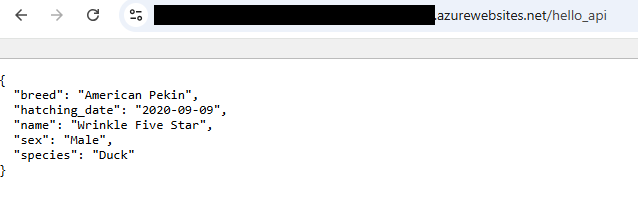
Add the following code in app.py
@app.route("/hello_api")
def hello_api():
    return {
		"name": "Wrinkle Five Star",
		"species": "Duck",
		"breed": "American Pekin",
		"hatching_date": "2020-09-09",
		"sex": "Male"
    }
Then test your endpoint